Why block an application?
An application may communicate with many IP addresses and network ranges, and additional networks may appear over time. Blocking each network individually can require repeated observation and action.
Application blocking makes this easier. WhoIsConnected can block the application's currently discovered networks and keep the application on a dynamic blocked-app list for the current session so newly discovered networks can also be blocked on refresh.
This provides stronger control over unwanted application communication without requiring you to identify and block every network one by one.
WhoIsConnected uses a single-selection model: only one application can be selected at a time.
Application selection is used for actions that apply to one application. App Details, Network Details, and AI Analysis are separate Premium functions with their own controls.
Network Control Can Reduce Unnecessary Exposure
Preventing applications from communicating with networks that you do not trust or do not want them to use can reduce unnecessary exposure and improve your control over security and privacy. A block does not by itself prove that the communication was malicious; use WhoIsConnected to observe, investigate, control and evaluate the result.
Selecting an Application
Click the selection control beside the application you want to act on. Selecting another application moves the selection to the newly selected application.
When an application is selected, the TERMINATE SELECTED button appears next to the existing controls.
In the Premium Edition, selecting an application also provides the application network-control functions described below.
Terminate Selected
TERMINATE SELECTED
Attempts to terminate the currently selected local application.
This action does not require the Premium application-blocking functions. The result depends on Windows permissions and application behaviour. Protected or system processes may not allow termination.
Applications Network Control — Premium
Application network blocking is a Premium Edition feature. It is different from terminating a process. Instead of closing the application, WhoIsConnected blocks the networks associated with applications placed on its blocked-app list.
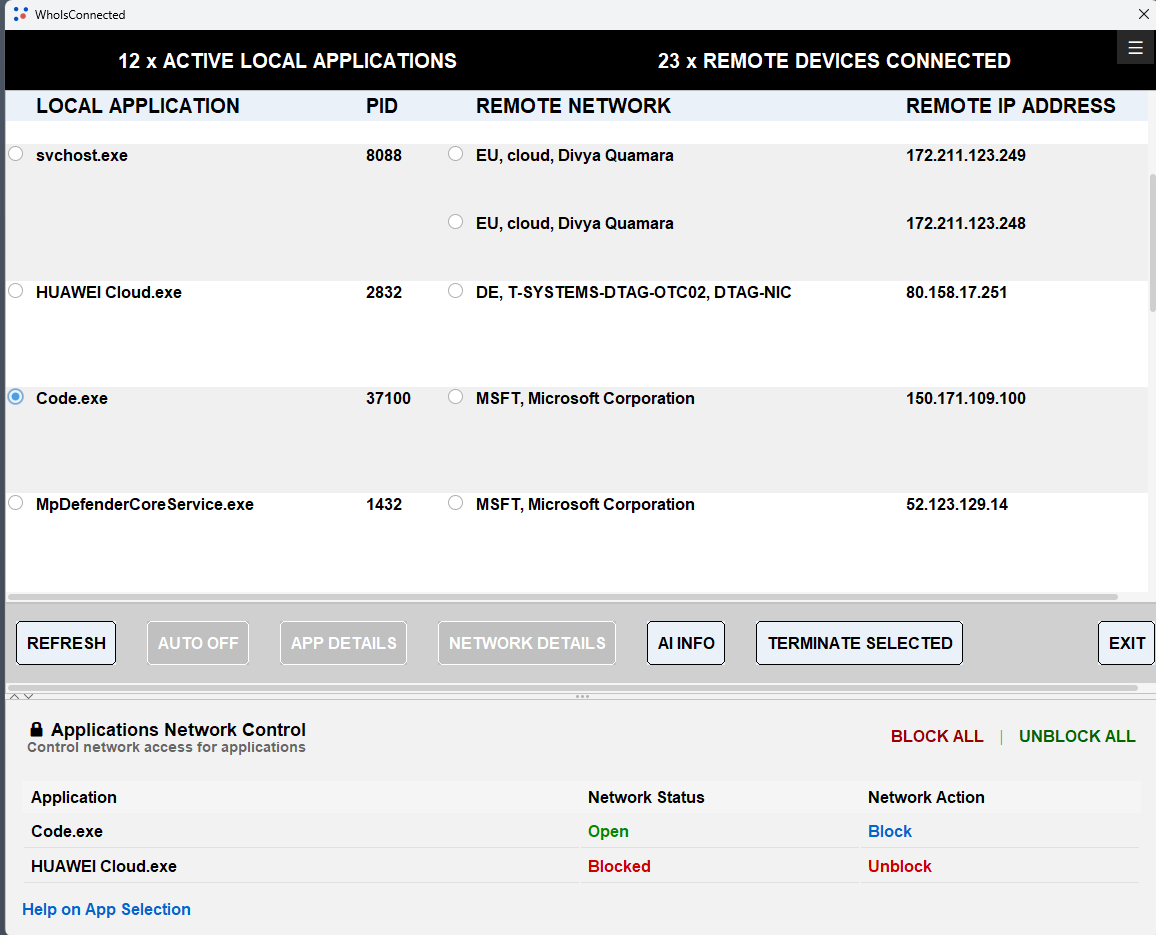
Block
After selecting an application, choose Block to add that application to the blocked-app list for the current WhoIsConnected session.
The application's currently discovered networks are blocked. While WhoIsConnected remains running, subsequent refreshes can discover additional networks used by that blocked application; those newly discovered networks are then blocked as well.
Unblock
Unblock removes the selected application from the current blocked-app list and unblocks all networks that were previously blocked for that application.
BLOCK ALL
BLOCK ALL applies only to the applications currently visible in the application table. Those currently displayed applications are added to the blocked-app list and their discovered networks are blocked.
While WhoIsConnected remains running, newly discovered networks belonging to those blocked applications are also blocked when they are found during a refresh.
UNBLOCK ALL
UNBLOCK ALL clears the current blocked-app list and unblocks all networks that were previously blocked for the applications in that list.
Administrator Permission Required for Network Control
The first time you use a Block or Unblock action during a WhoIsConnected session, Windows asks for administrator permission. Select Yes to allow HelperWhoIsConnected to start with administrator rights and perform the requested network-control actions.
Normally this approval is required only once while WhoIsConnected is running. If permission is not granted, blocking and unblocking cannot be performed. WhoIsConnected itself continues to run with normal user rights; elevation is requested for HelperWhoIsConnected when network control requires it.
TERMINATE SELECTED does not require administrator rights.
Blocked-App List and Persistence
The blocked-app list is maintained dynamically only while WhoIsConnected is running. It is not retained when WhoIsConnected is exited.
The network blocks that have already been created are persistent and remain in effect after WhoIsConnected is closed. If an application later uses a new network that was not previously discovered and blocked, start WhoIsConnected, select the application, and use Block again so its currently discovered networks can be processed.
App Selection vs. App Details and AI Analysis
Selecting an application is used for actions that apply to that selected application, such as TERMINATE SELECTED and, in the Premium Edition, application blocking and unblocking.
App Details and Network Details are independent of application or network selection. They have their own buttons and display detailed information for all applications or all networks currently shown by WhoIsConnected. These features are available in the Premium Edition.
AI Analysis is also a Premium feature, but works differently: AI Analysis applies to selected application and network pairs, as described in the AI Information Help section.
⚠ Caution
Save your work before terminating an application. Unsaved documents or other data may be lost.
Blocking networks used by an application may prevent updates, synchronization, sign-in, cloud access, or other online functions until the relevant blocks are removed.